Next app: Right Rudder

Radial AR

The room is the sky.

N36E1215S2124W3033FROMTOR 050HDG 2301 m

Put a virtual VOR station on your floor and walk around it. Your phone is the aircraft, and the needle, flag and DME show exactly what a real receiver would at that spot. Fifteen minutes of walking teaches what a semester of diagrams doesn’t.

Ask to join the TestFlight

In TestFlight now. Coming to the App Store for iPhone and iPad, iOS 17 or later.

Lesson 1

Your phone is the aircraft

Place the station on the floor and step back. Wherever you stand is where the aircraft is, and the receiver reads that exact spot: radial, needle, flag and distance.

Walk the arc from the 050 radial to the 030. The needle sweeps from right to left. You crossed radials, and the needle followed you.
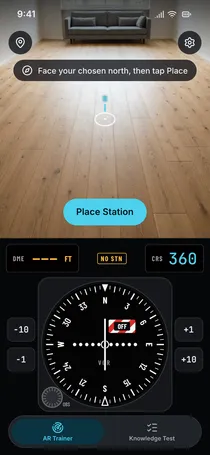
Placing the station in Radial AR: a living room floor with the prompt face your chosen north, then tap Place
Placing the station. Face your chosen north, then tap Place.

Lesson 2

Turn in place. Nothing moves.

Spin a full circle on the spot. The heading runs all the way round, and the needle, the flag and the DME hold still.

A VOR tells you where you are, never which way you point. On paper that is a rule to memorise. Standing in the room, you watch it happen.

Lesson 3

Turn the knob, or walk to the course

Set the OBS to 180 and the needle pegs right: the 360 radial lies off to your right. Walk over to it and the needle slides home to the centre, flag TO.

One needle, two ways to move it. Change the course you ask for, or change where you stand.

Lesson 4

Overhead, the needle gives up

Walk inbound. Close to the station you enter the cone of confusion and the flag drops to OFF. Keep going and you come out on the 180 radial, flag FROM.

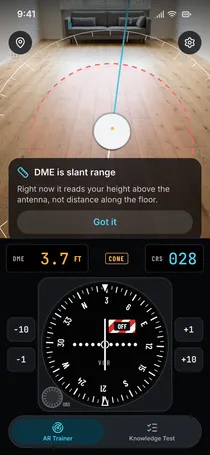
The DME never reaches zero. It measures slant range, so overhead it reads your phone’s height above the antenna: 3.6 feet when you hold it at chest height.

Radial AR overhead the station: the receiver shows CONE, the flag OFF and DME 3.7 feet, with a note that DME is slant range
In the app, overhead. CONE, flag OFF, DME 3.7 feet.

Lesson 5

Beyond the VOR

An NDB teaches the opposite

Stand still north of the beacon and turn. The ADF needle swings with every degree, because it shows where the station is relative to your nose. Add the heading and you get the bearing to the station.

Scroll to turn the phone. The bearing to the station stays 180.

NN36E1215S2124W3033
HDG 045RB 135MB 180

An ILS on your table

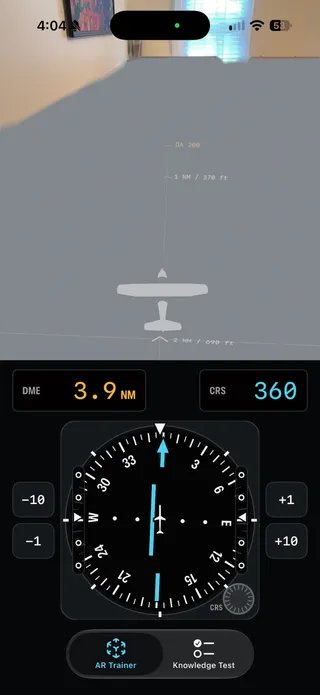
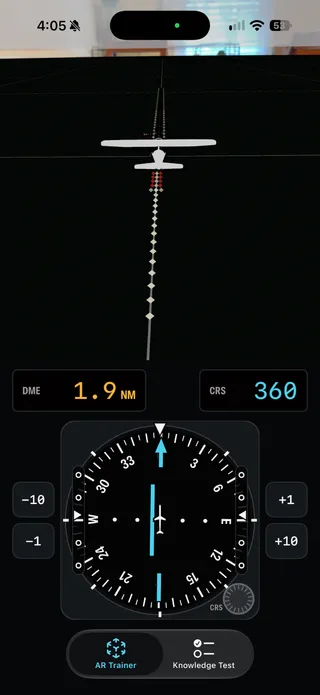
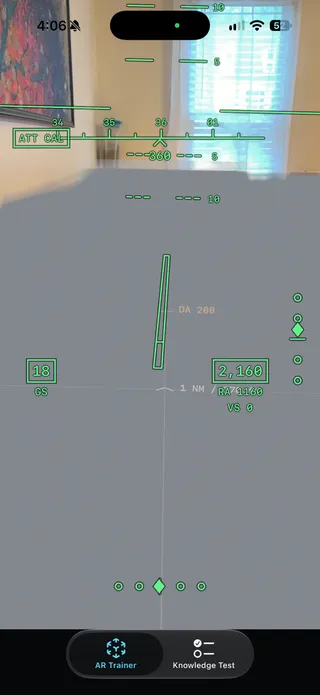
Set a runway on the kitchen table and fly the approach with the phone. Localizer and glideslope, mile markers along the centreline, an HSI with distance, and a head-up display when you want to look outside.

  • Tabletop ILS approach with mile markers on the extended centerline and an HSI reading 3.9 nautical miles
    Final approach on a table, mile markers on the centreline
  • Short final on the tabletop ILS
    Short final, needles centred
  • Green head-up display over the room showing heading tape, groundspeed 18, altitude 2,160 and localizer and glideslope diamonds
    The head-up display, over the same room

Lesson 6

Then sit the written test

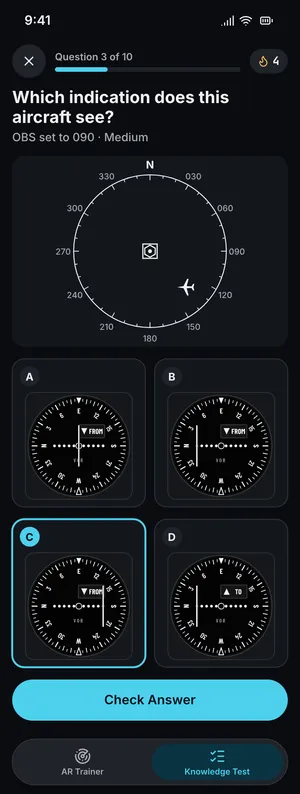
The classic VOR questions from the written test, practised until they are easy. An aircraft on a map: which indication does it see? An indication: which aircraft could be yours?

Every answer is computed by the code that drives the receiver in the room, and every wrong answer says why. No floor space needed.

  • Knowledge test question: pick the VOR indication that matches the aircraft on the map
    Which indication does this aircraft see?
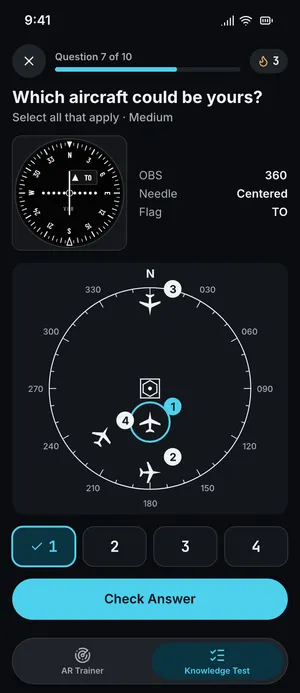
  • Knowledge test question: pick which numbered aircraft matches the VOR indication
    Which aircraft could be yours?
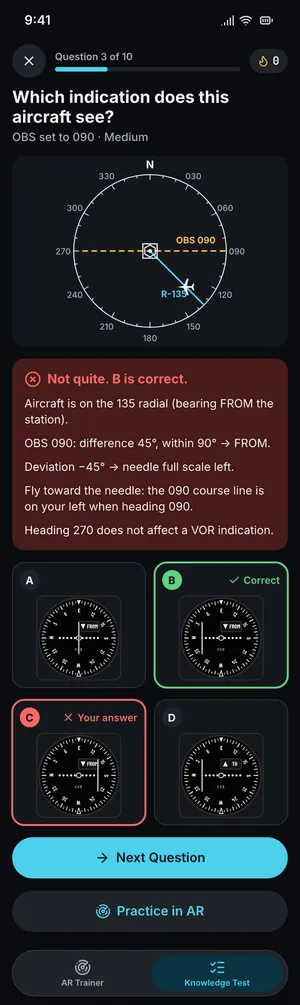
  • A knowledge test answer marked wrong, with the explanation: the aircraft is on the 135 radial, 45 degrees from the course, so the flag reads FROM and the needle sits full scale left
    A wrong answer, and why

What it is, and what it isn’t

  • A trainer for the picture in your head

    No flight dynamics, no airplane to fly. Position and pointing are the whole model, which is all a VOR, an NDB or an ILS ever knows about you.

  • Not an approved training device

    Use it before the lesson and before the written test. It doesn’t replace either, and it logs no time.

  • Nothing leaves the phone

    There is no sign-in, no tracking and no server. Your room stays your room.

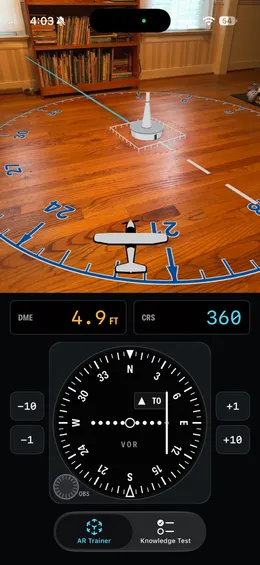
A virtual VOR station on a wooden floor with a compass rose, a small aircraft marker, and the VOR receiver below reading course 360, TO, DME 4.9 feet

What you need

Device
iPhone or iPad with iOS 17 or later
Floor
Roughly 3 × 3 m, well lit, with some texture: a rug or wood boards
Table
Any table, for the ILS

Questions

Is this a flight simulator?

No. There are no flight dynamics. Your phone’s position is the aircraft’s position, and its attitude is where it points. The point is to build the mental picture behind each instrument, not to fly an airplane.

How much space do I need?

About 3 by 3 meters of lit, textured floor for the VOR and NDB rooms. A rug or a wood floor tracks well; a plain glossy floor may not. The tabletop ILS needs a table and a few steps of walking room.

Can I log the time?

No. Radial AR is a training aid, not an FAA-approved training device, and it makes no logbook claims.

Does the knowledge test need AR?

No. The knowledge test practice works anywhere, including on devices without AR. Its answers come from the same math that drives the AR instruments.

What does it collect?

Nothing. No account, no analytics, no backend. If you choose true north, location is used once by ARKit to align the room and is never stored or sent.

Walk the radials yourself

Ask to join the TestFlight

One email asks for an invite to the beta.